
Choosing supply chain network design software is one of the most consequential technology decisions a supply chain team makes. The right tool lets you model your network, run scenarios in hours rather than weeks, and make design decisions backed by data. The wrong one sits unused within a year because it is too slow, too rigid, or too complex for your team to run without specialist support.
The software you choose is what makes that level of optimization practical or out of reach. According to Invesp, companies that optimize their supply chain networks can cut inventory levels by over 50% and reduce operating costs by up to 15 percent compared to those that do not.
In this guide, we’ll explain how to choose supply chain network design software, what to look for, what questions to ask vendors, and what mistakes to avoid so you can make a confident decision.
Start with Your Own Requirements, Not a Vendor’s Feature List
Most software evaluations go wrong before they start. Teams jump straight into demos without a clear picture of what their network actually needs. They end up comparing tools on features that look impressive in a presentation but have nothing to do with the decisions they need to make.
Before you look at a single vendor, answer these questions internally. They will shape every part of your evaluation.
1. How complex is your supply chain network?
The number of facilities, SKUs, countries, and transport modes you are working with determines whether you need a lightweight modeling tool or an enterprise-grade optimization platform. A company with 3 distribution centres and 500 SKUs has very different requirements from a manufacturer running 60 factories across 20 countries. Be honest about your current complexity and where you expect to be in three years.
2. What decisions do you need the software to support?
There is a meaningful difference between strategic network design — deciding where facilities should be, how many you need, which markets to serve from where — and tactical planning, which is about how to run the network you already have week to week. Some tools do one well. Some do both. Know which you need before you sit in a demo.
3. Who will actually use network design software?
If the answer is a small team of specialist analysts, you have more flexibility on complexity. If the answer is supply chain planners across multiple regions who need to run their own scenarios without consultant support, usability becomes one of the most important criteria on your list. More than 60% of supply chain professionals still rely on spreadsheets, largely because the tools available to them are too difficult to use independently.
4. How frequently do you need to redesign your supply chain network?
Companies that treat network design as a once-every-three-years project have different requirements from those that want to run scenarios continuously as conditions change. If you want to respond to tariff shifts, demand changes, or supply chain disruptions in days rather than months, you need a tool with fast solver speeds and easy scenario setup, not one that requires weeks of data preparation for every run.
5. What data do you have and where does it live?
The best optimization in the world produces nothing useful if it is fed with bad data. Before evaluating software, audit what data you have — demand history, transport costs, facility costs, lead times — and where it lives. Tools that connect directly to your ERP and logistics systems through automated data pipelines will save you the weeks of manual preparation that consume most of a typical network design project.
Getting clear on these five areas before you talk to vendors means you can evaluate tools against your actual situation rather than a generic checklist. It also means you will ask much better questions when you get to the demo stage.
6 Capabilities That Separate Serious Tools from Basic Ones
Not all supply chain network design software is built the same. Entry-level tools let you build basic models in a spreadsheet environment. Enterprise platforms handle thousands of SKUs, hundreds of facilities, and dozens of simultaneous scenarios across global networks. The gap between them is significant and the wrong choice in either direction costs you.
Here are the six capabilities that matter most and what to look for in each.
1. Solver Speed and Optimization Quality
This is the capability that most buyers underestimate and later regret getting wrong.
The solver is the mathematical engine that takes your network model and finds the optimal answer. Traditional solvers using classical branch-and-bound algorithms work well for small models but slow down dramatically as network complexity grows.
A model with half a million integer variables, dozens of time periods, and thousands of customer locations can take hours or days to solve on a conventional engine. That means your team can only run a handful of scenarios before a deadline, which limits the quality of your decisions.
What has changed in 2026 is that newer approaches, including quantum-inspired solvers, take a fundamentally different approach. Rather than exhaustively searching solution trees, they use AI agents trained on historical solving patterns to guide the optimization toward promising areas quickly.
The practical result is solve times 50 to 100 times faster on complex models; scenarios that previously took hours run in seconds.
Why this matters operationally: when scenarios are slow to run, teams run fewer of them. When teams run fewer scenarios, they miss options. Solver speed is a direct constraint on the quality of your network design decisions.
Red flag: Any vendor that cannot clearly tell you how long a model of your complexity will take to solve, or that requires you to simplify your model significantly just to make it workable.
2. Greenfield and Brownfield Analysis
These are the two foundational network design capabilities. Any serious tool should do both well.
Greenfield analysis answers the question: if you were building this network from scratch, where should your facilities go?
It evaluates potential distribution centre locations based on customer proximity, transport infrastructure, and cost data. The important detail here is accuracy. Many tools calculate greenfield locations using straight-line distances between the proposed facility and demand points.
In the real world, goods move by road, not as the crow flies. Tools that use actual road distance data produce meaningfully different and more accurate facility location recommendations, particularly in regions with complex terrain or limited road networks.
Brownfield analysis answers a different question: given the network you already have, what changes would most improve your cost and service performance?
It evaluates consolidation options, flow realignment, and facility repurposing without requiring you to redesign from scratch.
Most companies need both. A company entering a new market or expanding its footprint needs greenfield. A company running an established network that has grown organically rather than by design needs brownfield. A tool that handles only one limits your options significantly.
Red flag: Greenfield tools that rely on straight-line distance calculations. Ask vendors if they use road distance or Euclidean distance. The answer tells you a lot about the tool’s accuracy.
3. Scenario Flexibility and Speed of Setup
A network design tool that can only run three scenarios at a time, or takes a week to set up each one, is not a tool for continuous planning. It is a tool for occasional projects.
Scenario flexibility means being able to quickly model variations of your network such as different numbers of distribution centres, different sourcing configurations, different demand projections and compare them side by side.
The best tools let your planning team create and run new scenarios without specialist support. They do not require a consultant to change an assumption or a data engineer to rebuild the model when conditions shift.
This matters more than ever in 2026, when tariff changes, demand shifts, and supply disruptions can arrive with very little notice.
A company that can model the cost and service impact of a new tariff scenario in hours rather than weeks has a material competitive advantage over one that has to wait for a formal project to get started.
Supply chain scenario planning done well is an ongoing practice, not a one-off exercise. The software that supports it should feel like a planning tool, not a consulting engagement.
Red flag: Scenarios that must queue behind each other instead of running in parallel, or that require consultant involvement to set up basic what-if analyses.
4. Data Integration and Automation
Most project teams spend more than 70% of a network design project on data preparation. It includes cleaning, formatting, and reconciling data from ERP systems, transport management systems, and demand planning tools before the actual modelling can begin.
That is not an inevitable reality. It is a symptom of tools that lack proper data integration. The best supply chain network design software connects directly to your existing data sources through automated pipelines. It pulls transport costs, demand history, facility costs, and lead times from your ERP and logistics systems without requiring manual export and reformatting.
When data changes, as it does constantly in a live supply chain, the model updates automatically rather than requiring a manual refresh.
Rapid baselining, the process of building an accurate model of your current network from operational data should take days, not months. When it takes months, organizations end up running network design studies on data that is already out of date, which undermines the value of the analysis before it even starts.
Ask vendors specifically:
- How does your platform connect to SAP, Oracle, or our ERP?
- What does the data preparation process look like for a company at our scale?
- How long does a typical baseline build take?
Red flag: Tools that require manual CSV uploads for every model run, or that lack native ERP connectivity and rely entirely on client-side data preparation.
5. Multi-user Collaboration and Shared Models
Supply chain network design is rarely a solo exercise. The findings from a network design study typically need to be reviewed by finance, operations, logistics, and procurement before a decision is made. Different team members need to interrogate the same model from different angles.
Tools that lock models to a single user, or require exporting results to PowerPoint before anyone else can see them, create bottlenecks that slow decision-making and introduce errors.
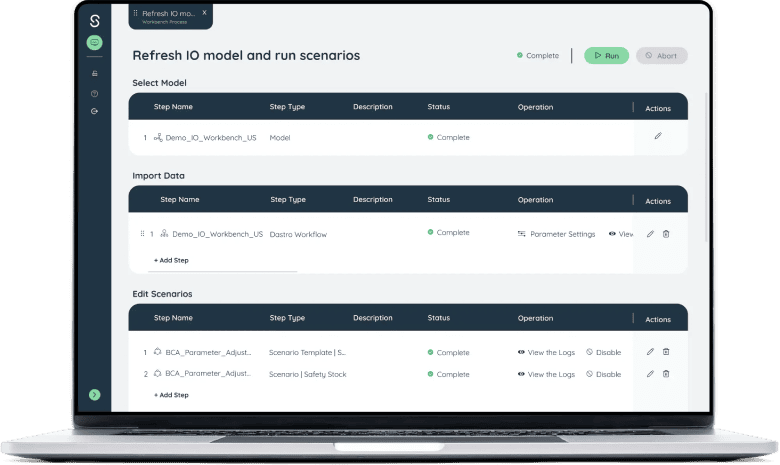
Look for platforms that allow multiple users to work within the same model environment, share scenarios, and build dashboards that non-technical stakeholders can use to explore results without needing to understand the underlying optimization.
This also matters for global teams. A supply chain design team in London should be able to share a model with a planning team in Singapore or Chicago without version control issues or data transfer friction.
One specific thing to look for: the ability for business users to interact with model results through a simplified interface without needing full access to the modelling environment.
This dramatically broadens internal adoption of the platform beyond the core modelling team.
Red flag: Tools where sharing a model means sending files by email, or where results can only be interpreted by the person who built the model.
6. Deployment Options, Security, and Compliance
For many enterprise buyers, particularly in regulated industries like pharmaceuticals, financial services, and defence supply chains, where your data is stored and how it is protected is not a secondary concern.
Cloud-native platforms offer the most flexibility and scalability for most organizations. They can be accessed from anywhere, scale computing resources dynamically for large model runs, and are updated continuously without requiring internal IT effort.
Sophus is cloud-native and ISO 27001 certified, which covers the security standards most enterprise procurement teams require.
However, some organizations have data residency requirements, regulatory constraints, or security policies that make a public cloud deployment difficult or impossible.
For these buyers, on-premise deployment support is a non-negotiable requirement, not a nice-to-have. Not all tools offer it. Make sure to confirm early in your evaluation whether the vendor can support your deployment model and what the performance implications are if you go on-premise versus cloud.
Also worth checking: multi-tenancy and data isolation. If a vendor hosts multiple clients on shared infrastructure, confirm that your network data, cost structures, and supply chain configurations are properly isolated from other clients.
Red flag: Vendors who cannot provide evidence of security certifications (SOC 2, ISO 27001), or who cannot clearly explain their data isolation approach for multi-tenant environments.
Seen any of those red flags in your current tool?
Book a call with Sophus and we will show you specifically how Sophus handles the ones that matter most to your network, solver speed, data integration, and scenario setup, live, using data at your scale.
Questions to Ask Vendors During a Demo
Most vendor demos are designed to impress you. You will see a polished interface, pre-built scenarios, and results that appear in seconds. What you will not automatically see is how the tool performs on your data, at your network’s complexity, without a consultant running it.
These questions cut through the presentation and get to what actually matters.
1. How long does it take to build a baseline model from our ERP data?
This is the first real test of a tool’s practical usefulness. If the answer is “several weeks with your team’s support and ours,” you are looking at a tool that will absorb most of your project timeline before any actual analysis begins. The answer you want is days, with automated data pipelines doing the heavy lifting.
2. Can you run this demo on a model the size and complexity of our network?
Ask them to stop the pre-built demo and either run a live model at your scale or show you documented results from a client with a similar network size. Number of nodes, SKUs, countries, and transport modes are the relevant dimensions. If the demo only works on a simplified toy model, that tells you something important about real-world performance.
3. How does your solver handle model infeasibility?
This is a question most buyers never ask, and it is one of the most revealing ones. Every network model eventually hits an infeasibility — a situation where the constraints you have set cannot all be satisfied simultaneously. A good tool tells you clearly which constraint is causing the problem and why. A weak tool gives you a generic error message and leaves your team spending days debugging data.
4. Can our planners run new scenarios without consultant support?
If the honest answer is no or is hedged with “it depends on the complexity”, you are looking at a tool that will require ongoing external involvement every time you want to run an analysis. That drives up total cost of ownership significantly and creates a bottleneck on every design decision.
5. What does your implementation timeline look like in weeks, not months?
Enterprise software vendors are trained to frame implementation timelines in months because it sounds more substantial. Push for weeks. Ask what the fastest implementation they have done at your scale looked like and what made it possible. The answer reveals how much of the implementation effort falls on your team versus theirs.
6. How do you handle data updates when our transport costs or demand changes?
A network model that is not kept current quickly becomes irrelevant. Ask specifically how the tool refreshes when underlying data changes. Does it require a full model rebuild? Does it pull from your ERP automatically? How long does a data refresh take on a model at your scale?
7. Can multiple users work in the same model simultaneously?
If the answer is no, or if sharing a model means exporting a file, your team will quickly run into version control problems as different stakeholders try to interrogate results in parallel. This matters most for global teams and cross-functional reviews.
8. What security certifications do you hold and what are your data isolation practices?
For enterprise buyers, this is non-negotiable. Ask for SOC 2 Type II and ISO 27001 documentation. Ask specifically whether your data is isolated from other clients on shared infrastructure, and what their policy is on using client data for model training or product improvement.
9. Show me a scenario that failed and what happened next.
Every serious vendor has had a project where something went wrong. How they talk about it tells you more about their support quality and partnership model than any success story will. A vendor who cannot answer this question is either inexperienced or not being honest.
10. What does your pricing look like when we scale from 5 users to 30?
Pricing structures that look reasonable at initial purchase often become painful at scale. Understand now whether pricing is per user, per model run, per compute hour, or a flat platform fee. The total cost of ownership over three years is the number that matters, not the headline contract figure.
11. Do you support on-premise deployment, and what are the performance trade-offs?
If your organization has data residency requirements or security policies that make public cloud difficult, get a clear answer on this early. Not all tools support it. Those that do often have constraints on solver performance or update frequency in an on-premise environment that are worth understanding before you commit.
12. What does the handover look like after implementation? Who owns the model going forward?
Some vendors implement and leave. Others build a model that lives with a consultant rather than with your team. The goal should be a model your planners own and can run independently within weeks of go-live. Ask for a specific description of the handover process and what training is included.
Bring These Questions to a Sophus Demo!
We will answer every one of them on a live model built around your network complexity, your industry, and your data sources. No pre-built scenarios, no simplified examples.
Most teams walk away with a working baseline model started within the same session. Book a demo with us and see how Sophus performs against your requirements, not ours.
Common Mistakes Companies Make When Choosing
Even well-run procurement teams make predictable errors when evaluating supply chain network design software. Most of these mistakes are not obvious at the time. However, they become clear six months after go-live, when adoption stalls or the tool does not perform the way the demo suggested it would.
Here are the five mistakes worth knowing about before you start.
Mistake 1: Choosing on Demo Polish Rather Than Solver Quality
Vendors spend significant effort making their demos look impressive. The interface is clean, the scenarios load instantly, and the results appear to confirm whatever thesis the salesperson has been building. What you are often not seeing is the pre-built model running on simplified data at a fraction of your network’s actual complexity.
Ask to see a model run live at your scale. If the vendor cannot or will not do that, treat it as a meaningful signal.
Mistake 2: Underestimating the Data Preparation Effort
The single most common reason supply chain software implementations run over time and over budget is data. Most organizations discover mid-project that their ERP data is messier than expected — inconsistent cost structures, missing lead times, fragmented demand history across systems. Tools that lack automated data pipelines push all of this work onto your team.
Before signing, ask specifically how the tool handles data from your ERP and what the typical data preparation timeline looks like at your scale. If the answer is vague, assume it will be longer and harder than the vendor suggests.
Mistake 3: IT Buys It, Planners Do nNot Use It
Supply chain network design software is purchased by procurement or IT and evaluated by analysts. But the people who need to use it day to day are supply chain planners, often ones who have been running models in Excel for years and are sceptical of new tools.
If your planners are not involved in the evaluation and their usability concerns are not treated as primary requirements, you risk buying a technically capable tool that sits largely unused. Adoption is not a training problem — it is a design problem. The tool needs to be usable by your actual team without specialist support.
Mistake 4: Evaluating Features Instead of Use Cases
The question is not “does this tool have greenfield analysis?” most serious tools do. The question is “can this tool handle a greenfield analysis for our specific geography, with our road network complexity, using our demand data, and return results in a timeframe that is useful for our planning cycle?”
Features are binary. Use cases are contextual. Make sure your evaluation is built around the specific decisions you need to make, not a generic capability checklist.
Mistake 5: Ignoring Total Cost of Ownership
The headline contract figure rarely reflects what you will actually spend. Factor in implementation costs, consultant fees for ongoing model support, training, data integration work, and the cost of scaling from your initial user count to full team adoption. Some tools that look affordable upfront become expensive when you account for the consultant dependency they create.
Ask for a three-year total cost projection that includes all of these components. Compare on that number, not the annual licence fee.
How to Build the Internal Business Case
Getting sign-off on supply chain network design software typically requires convincing two audiences: supply chain leadership, who understand the operational need, and finance or procurement, who need to see a return on investment before approving the budget.
Here is a framework that works for both.
Start With the Cost of Your Current Approach
Before you can argue for a new tool, you need to quantify what your current approach actually costs.
This includes the time your team spends on manual data preparation for each analysis, the consultant fees you pay to run network design studies, the frequency with which you are able to run those studies, and the cost of decisions made without proper analysis because a study would take too long.
For most companies running network design studies manually or through consultants, the total annual cost sits between $200,000 and $500,000 when you account for internal time, external fees, and delayed or suboptimal decisions. That number is your baseline.
Frame the ROI Around Network Savings, Not Software Savings
The software itself is not the value proposition. The network improvements it enables are.
A 15% reduction in logistics costs on a supply chain with $50 million in annual network spend is $7.5 million per year. A 10% reduction on a $200 million network is $20 million per year.
These are the numbers that get finance’s attention. Use your current network spend as the denominator and reference benchmarks from companies at a similar scale.
Address the Cost of Doing Nothing
Every year you delay redesigning your network is a year of running at sub-optimal cost. If your network has not been properly reviewed in the last two to three years, it is almost certainly not aligned with your current demand patterns, cost structure, or supplier base. That misalignment has a price, even if it is not visible in a single line on the P&L.
Frame the status quo as a choice with a cost, not the absence of a decision.
Reference Real Outcomes From Comparable Companies
Abstract ROI arguments are less convincing than specific examples. With Sophus, companies are not just improving operations. They are redesigning their networks to unlock measurable cost savings and long-term efficiency.
Lee Kum Kee achieved over $20 million in sustainable savings from a network redesign using cost-to-serve as the central metric.
A global food and beverage manufacturer with 63 factories drove over $30 million in savings by replacing manual planning with optimization.
Tsingtao Beer saved tens of millions annually after redesigning their supply chain planning process with Sophus.
None of these companies had unlimited budgets or uniquely favourable circumstances. They had the same data quality challenges, the same internal resistance, and the same ROI pressure that any company faces. The outcomes came from making the decision to redesign seriously.
Typical Implementation Timeline
For finance teams who need to project when benefits will begin to materialise: a well-run implementation with a tool that has strong data integration capabilities typically reaches a working baseline model within two to four weeks of project start. Scenario analysis capability follows within the first month. Full team adoption, depending on organization size and complexity, typically completes within two to three months.
This timeline is significantly shorter than traditional network design projects or ERP implementations, which is worth emphasising when your finance team tries to compare the two categories.
Ready to build your business case with real numbers from your network?
Request a demo with Sophus and we will help you model the potential savings from a network redesign based on your current cost structure. Most teams leave with a draft ROI framework they can take directly to their finance sign-off conversation.
Why Companies Choose Sophus?
Sophus is purpose-built for supply chain network design. Not adapted from a broader planning suite, not bolted onto a procurement platform. Every capability in the platform exists to help teams model, optimize, and redesign their networks faster and with greater confidence.
Sophus is recognized as a vendor on Gartner Peer Insights in the Supply Chain Network Design Tools market, rated by verified supply chain practitioners across manufacturing, retail, logistics, and consumer goods.

Reviewers highlight the platform’s ability to deliver clarity on network decisions, quantify cost-saving opportunities, and align cross-functional teams around a single planning model.
Here is what that looks like in practice.
Solver Speed That Changes What Is Practically Possible
Sophus is 50 to 100x faster than traditional MILP-based solvers on complex models.
A network with half a million integer variables runs to near-optimal in seconds, not hours. That speed difference changes how frequently your team can run scenarios and what level of complexity you can realistically model without simplifying away the detail that matters.
A Baseline Model in 48 Hours, Not 8 Weeks
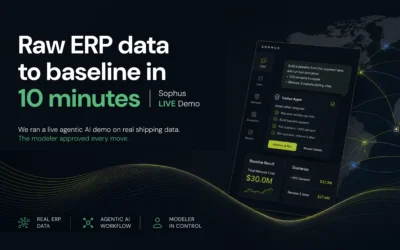
From raw ERP data to a working network model in 48 hours.
Sophus’s data automation module connects directly to your ERP, data lakes, and logistics systems through automated pipelines. Traditional projects spend 6 to 8 weeks on data preparation alone before any analysis begins. That time compression means faster decisions and significantly lower project costs.
Built for Planners, Not Just Analysts
Teams get up to speed in hours or days, not months.
No coding, no query writing, no specialist required to run a scenario. JD.com runs hundreds of model scenarios daily with a team of 30 planners, generating hundreds of millions of dollars in value annually. The platform was deployed on-premise under JD.com’s own firewall, full solver capability, no cloud dependency.
Greenfield Analysis Using Real Road Distance
Most tools find optimal facility locations using Euclidean distance, which ignores terrain, road networks, and restricted zones. Sophus uses actual road distance data, producing materially more accurate facility location recommendations particularly in complex geographies where the difference between the two methods is significant.
ISO 27001 Certified, Cloud-Native with On-Premise Support
Sophus is ISO 27001 certified and SOC 2 compliant. Both deployment models run the full solver capability with no performance trade-off.
100+ Companies Across Global Industries
Sophus is used by manufacturers, retailers, logistics providers, and consumer goods companies to run network design, inventory optimization, and scenario planning at scale. Organizations such as Hisense, Tsingtao Beer, Lee Kum Kee, JD.com, and Lifetime Brands rely on Sophus to support decision-making across their global operations.
Your Supply Chain Network Is Worth Getting Right!
Most supply chain costs are locked in by design decisions, not operational ones. The companies saving tens of millions annually are not working harder than their competitors. They are working on a better-designed network.
You now have the framework to choose the software that makes that possible. Stop running your supply chain on a network that was designed for a different world.
Bring your network data. We will show you exactly what Sophus finds in it.
Frequently Asked Questions
What should supply chain network design software include?
The core capabilities are solver speed, greenfield and brownfield analysis, scenario modelling, automated data integration, multi-user collaboration, and deployment flexibility. A serious tool should handle your full network complexity without requiring you to simplify the model. Ease of use for non-technical planners is equally important.
What is supply chain network design software?
It is software that helps companies make strategic decisions about the structure of their supply chain — facility locations, distribution flows, sourcing strategy, and inventory positioning. It is different from supply chain planning software, which handles day-to-day execution. Network design software operates at a longer time horizon and has a much larger impact on your cost base.
How long does implementation take?
A platform with automated data integration can produce a working baseline model within 48 hours. Full team adoption typically takes two to three months. Implementations that rely on manual data preparation take significantly longer, often spending the first six to eight weeks on data alone.
How do I build a business case for this software?
Start by quantifying what your current approach costs — consultant fees, internal time, and delayed decisions. Then frame the ROI around network savings: a 15% cost reduction on a $50 million logistics spend is $7.5 million per year. The cost of doing nothing is just as real as the cost of the software.
Does supply chain network design software support on-premise deployment?
Not all tools do. Sophus supports both cloud-native and on-premise deployment with full solver capability in both configurations. It is suitable for organizations with data residency requirements or internal security policies that make public cloud difficult.